Quick Answer:

No, Canvas cannot detect ChatGPT by itself because the Canvas LMS does not have any native AI-writing detector.

So, whether it can flag AI text or not depends on a third-party tool your school connects.

The most common practice, however, is using Turnitin for Canvas.

The school or instructor, however, has to enable or switch on Turnitin by clicking on the “Edit” tab while creating an assignment.
Hi, if you are not familiar with Canvas, it is a learning management system from Instructure.
Students navigating how to use AI in studying often think that the Canvas platform scans every upload.
However, Canvas functions as a container for assignment submissions, grades, and course activities.
The AI detection part is done by an additional tool or integration like Turnitin.
Can Canvas Detect ChatGPT? The Key Takeaways
- The Canvas learning management system (LMS) cannot analyze or flag AI writing.
- AI detection is only possible when an instructor or an institution licenses and enables a connected tool like Turnitin.
- The 2025 partnership between Instructure and OpenAI introduces a native feature called “LLM-Enabled Assignments” (part of the IgniteAI suite).
- It does not function as a traditional AI detector.
- With this, the teacher intentionally integrates the AI into the Canvas assignment system to find out how students interact with it.
- Every AI score, irrespective of the tool used, is a probability.
- AI detectors use “perplexity” and “burstiness” to offer a score and predict the chances of a text being AI-written.
- So, powerful tools such as Turnitin say that it should not be the sole basis for action against a student.
What Can Canvas Record?
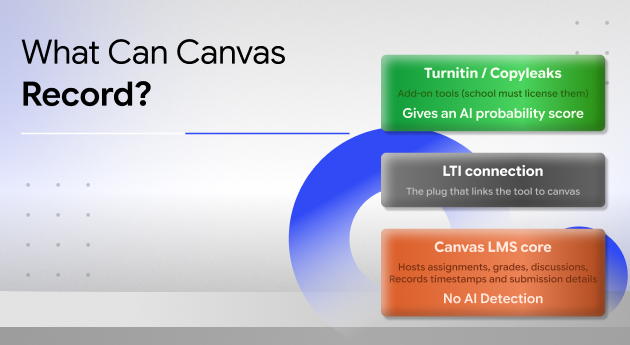
I already mentioned that Canvas has no native feature for AI detection.
It cannot scan text and label it as AI-generated.
So, the AI assessment your instructors see depends on the tools your institutions have integrated.
Instead, Canvas can record ordinary administrative data such as:
- Submission Timestamps
- Submission Details
So, it can detect when and how an assignment was submitted and does not read whether a sentence has been written by ChatGPT or not.
How Third-Party Detectors Plug In?
Schools and institutions can integrate an external AI detection tool through the Learning Tools Interoperability or LTI standard.
Turnitin, in its Canvas integration release notes, describes that an AI writing percentage of an assignment will appear alongside, but separately from, the similarity score.
Copyleaks is another common integration for AI detection on Canvas.
| Layer | What it does | Can it flag ChatGPT text? |
| Canvas LMS core | • Hosts assignments. • Give grades • Allows discussions • Contains timestamps | No |
| Turnitin via LTI | Produces an AI writing indicator and report | Yes, as a probability. |
| Other connected detectors (e.g., Copyleaks) | Add their own AI reports if licensed | Yes, as a probability. |
| LLM-Enabled Assignment (Canvas + OpenAI) | Runs a guided AI chat inside the assignment | • Shows AI use inside that assignment only. • Tests how students interact with AI. |
Which AI Detector Is Actually Scanning Your Work?
As Canvas itself stays neutral, the common question is which tool your school has integrated and how the tool is configured.
Turnitin’s AI Writing Report
“Turnitin’s AI writing detection capability is designed to help educators identify text that might be prepared by a generative AI tool, such as large-language models, chatbots, word spinners, and bypasser tools.”
Furthermore, the assignment needs to have at least 300 words, and Turnitin can scan a maximum of 30,000 words.
Also, it can now scan texts in English, Spanish, Japanese, and Arabic.
Moreover, it analyses qualifying prose only.
So, if the answers are very short or someone has submitted non-prose content, Turnitin will not score it.
Is Turnitin Switched On For Your Course?
The licenses for Turnitin and Canvas are different.
So, you will have to enable the AI detector on your institution’s Canvas account.
Furthermore, if you are worried about the multi-factor authentication or MFA setup, you can rest assured.
This setup is only if you are accessing Turnitin directly on the web.
The August 12, 2026 update of Turnitin says,
“As part of this update, an optional MFA setting for administrators allows for the activation of multi-factor authentication across instructor and student roles.
These changes apply only to instructors and students who access Turnitin directly through the web.
Users who access Turnitin through a VLE/LMS, such as Canvas, Moodle, or Blackboard, can continue using their existing LMS workflows with no changes.”
Beyond Software
AI detection through the integrated detector on Canvas is just a part of the assessment process.
If you are an instructor, you need to compare the current submission with the student’s earlier assignments.
You can even ask follow-up questions in the class.
Moreover, check whether the AI citations and AI disclosure statement are included and whether they align with the institutional policy and match the usage mentioned.
In addition, Turnitin will only check the “Qualifying Prose.”
In its release notes, Turnitin defines a qualifying text.
“Qualifying text (prose sentences contained in long-form writing format) means individual sentences contained in paragraphs that make up a longer piece of written work, such as an essay, a dissertation, or an article, etc.
The model does not reliably detect AI-generated text in the form of non-prose, such as poetry, scripts, or code, nor does it detect short-form/unconventional writing such as bullet points, tables, or annotated bibliographies.
This means that a document containing several different writing types would result in a disparity between the percentage and the highlights.”
Can Canvas Detect ChatGPT: Know The Common Myths
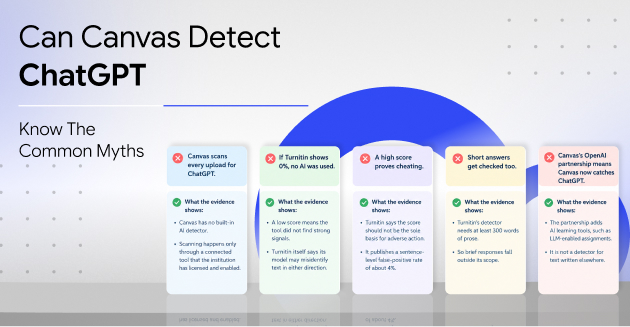
| Myth | What the Evidence Shows |
| Canvas scans every upload for ChatGPT. | • Canvas has no built-in AI detector. • Scanning happens only through a connected tool that the institution has licensed and enabled. |
| If Turnitin shows 0%, no AI was used. | • A low score means the tool did not find strong signals. • Turnitin itself says its model may misidentify text in either direction. |
| A high score proves cheating. | • Turnitin says the score should not be the sole basis for adverse action. • It publishes a sentence-level false-positive rate of about 4%. |
| Short answers get checked too. | • Turnitin’s detector needs at least 300 words of prose. • So brief responses fall outside its scope. |
| Canvas’s OpenAI partnership means Canvas now catches ChatGPT. | • The partnership adds AI learning tools, such as LLM-enabled assignments. • It is not a detector for text written elsewhere. |
The New AI Features Of Canvas
Instructure and OpenAI announced a global partnership on 23rd July 2025.
introduced the LLM-Enabled Assignment, a custom GPT-style experience built into Canvas.
This is an important upgrade helping educators gain insights about how students interact with AI during specific assignments.
The information about this AI usage remains confidential to Canvas, and it is not shared with OpenAI.
However, the InstructureCon 2025 summary from Instructure says that institutions will need to supply their own LLM API key to use the feature.
It says,
“LLM-enabled assignments will be available to Canvas customers at no additional cost, but institutions will need to provide their own LLM API key.
This feature is currently in development, with plans to start an early adopter program later this year.”
A Hypothetical Example:
Suppose you are an instructor and you set up an LLM-enabled assignment in which students debate a historical question with an AI tutor.
You can now review the conversation of each student and see how the student reasoned.
This visibility is only applicable to the use of AI inside the assignment.
So, it will never detect what the same student has done in a separate ChatGPT window.
How Reliable Are The AI Detection Scores That Instructors See On Canvas?
If you know how AI detectors work, reliability remains a question regarding the score provided by Turnitin integrated with Canvas.
Here are some key figures curated from Turnitin’s own data and other independent research.
| Metric | Figure | Source |
| Turnitin document-level false positives (over 20% AI detected) | Under 1% | Turnitin |
| Turnitin sentence-level false positives | About 4% | Turnitin |
| Submissions with over 80% AI text in first six weeks (38.5M scanned) | 3.5% | THE Journal |
| Average false-positive rate on non-native English essays (seven detectors) | 61.3% | Liang et al. |
Furthermore, Turnitin marks scores under 20% with an asterisk because they are less reliable.
Also, its guidance states that the score should not be the “sole basis for adverse actions against a student.”
Moreover, an independent study of 14 tools, Weber-Wulff et al., found them “neither accurate nor reliable.”
What To Do If A Canvas Assignment Is Flagged
A flag is a prompt for review, and both students and instructors have a part in making that review fair.
If You Are A Student
- Read your course’s AI policy and follow its disclosure rules.
- Gather drafts, notes, and version history that show how the work developed.
- Ask for a review conversation and explain your process calmly.
If You Are An Educator
- Treat the percentage as one input, alongside drafts, class performance, and a short conversation.
- Be especially careful with non-native English writers and with low scores that carry an asterisk.
Can Canvas Detect ChatGPT? Frequently Asked Questions (FAQs)
Here are the frequently asked questions and answers about whether Canvas can detect ChatGPT or not.
Can Canvas Detect ChatGPT In Discussion Posts?
No, Canvas cannot detect ChatGPT in discussion posts on its own.
It can only detect ChatGPT in the discussion post if your school has configured a detector to run on discussion text.
Many integrations focus on file and text-entry assignments.
So, check your institution’s setup.
Does Canvas Detect ChatGPT On Quizzes?
No, Canvas does not detect ChatGPT on quizzes.
Quiz integrity, where used, typically relies on separate settings or proctoring tools.
Can An Instructor Tell I Used ChatGPT Without A Detector?
Honestly, with years in the field, an instructor can tell whether you have used ChatGPT or not.
Even without using a detector tool, an experienced instructor can notice a sudden shift in voice or content that does not match discussions in the class.
That is why you need to keep drafts and write in your own voice.